User Management Changes for 4.38
The following change has been made to the User Management module for 4.38:
 Ability to add a secondary role to EBS Ontrack Hub users with a primary role
The EBS Ontrack secondary roles group has been added to User Management enabling users with a role in the EBS Ontrack primary roles group to be granted a secondary role. Refer to General Changes for further information.
An error message is displayed if you attempt to save a user with the same role (for example: Tutor) selected in the EBS Ontrack primary roles and EBS Ontrack secondary roles groups.
Ability to switch between primary and secondary roles in EBS Ontrack Hub
Users with a role in both the EBS Ontrack primary roles group and the EBS Ontrack secondary roles group can now switch between EBS Ontrack Hub sessions without re-entering their user credentials.
To switch between your primary or secondary persona, select the relevant option (for example: View as Tutor) in the header menu.
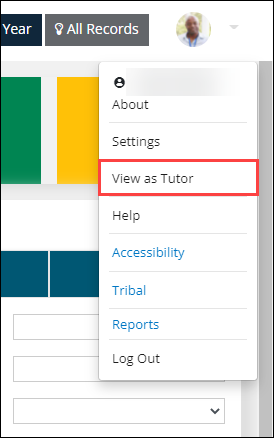
User can view their current persona in the About window.